
SELECTED WORK
ERP project reporting.
See the engineering at work.
An inside view of an ERP project-reporting implementation, with progress, resource visibility and budget analysis in the same operational interface.
ACTUAL INTERFACE · CLIENT DETAILS REDACTED
ERP & OPERATIONAL SYSTEMS
One workspace.
Three operational views.
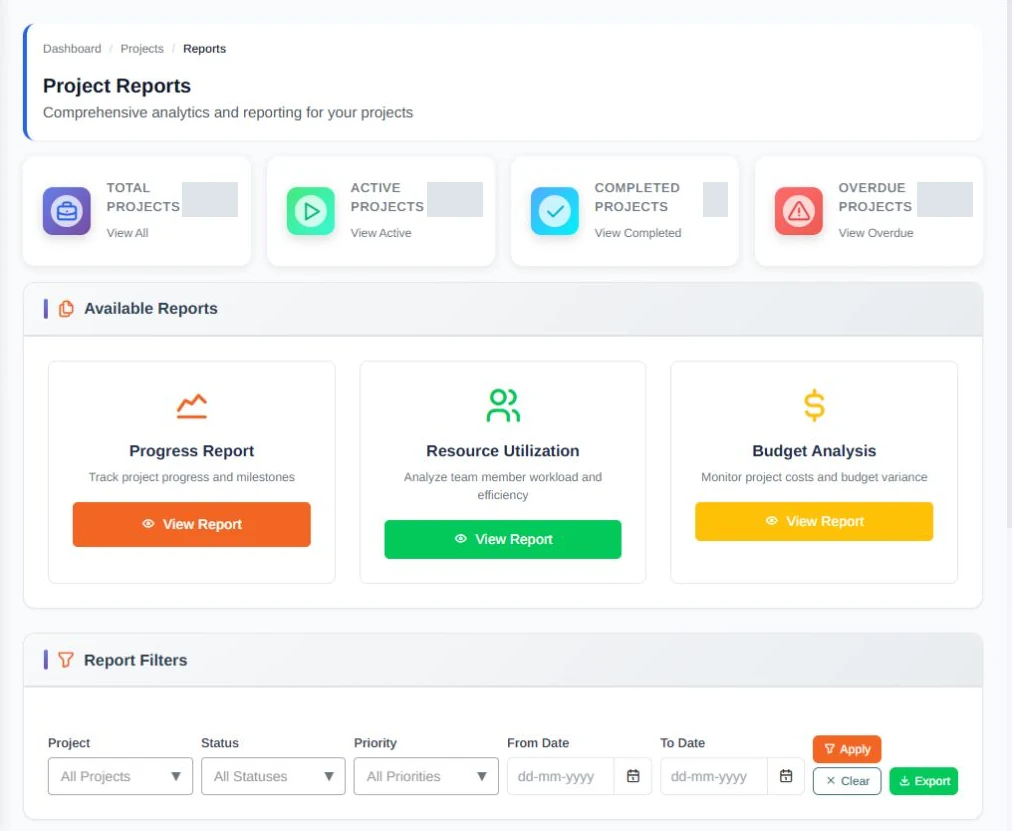
Project reporting in a working context.
The supplied implementation brings project reports and filters into a shared workspace. Project, status, priority and reporting period provide a practical route to the information a team needs.
Client identity and operational counts are withheld in this public view.
Progress reporting
Review project progress and milestones from the reporting workspace.
Resource utilization
Explore the view used to report on team workload and resource efficiency.
Budget analysis
Access the reporting view for project costs and budget variance.
WHAT THE INTERFACE SHOWS
Context makes reporting useful.
A shared starting point
Related reports live together, so users can move between operational questions without searching across separate tools.
A relevant reporting period
Filters help users narrow the view by project, status, priority and date range.
Information that travels
Reporting and export controls provide a route to review and share information from the workspace.
This is interface evidence from one implementation. It does not claim measured business improvements or represent every capability available in an ERP system.
BUILD AROUND YOUR OPERATION
Your reports should answer
your team's questions.
Start with the decisions your team needs to make, the records they rely on and the systems holding that information.
ERP & operational systems
Connect records across projects, resources and business functions.
Connected business systems
Plan how information moves between existing ERP, CRM and applications.
Custom business applications
Build purposeful tools and reporting around the way your teams work.